



 Custom Website DesignLearn More
 ELEMENTOR
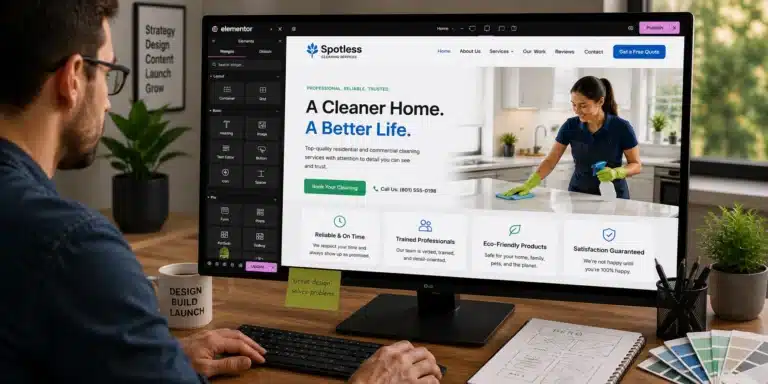
Build Flexible WordPress Experiences With Elementor
Visual WordPress development for responsive business websites, reusable templates, dynamic content, and custom Elementor workflows.
More Than Drag-and-Drop Page Building
Elementor provides a visual development environment for WordPress, but the quality of the finished website still depends on structure, responsive decisions, performance, content, and how reusable the build is.
MPARO uses Elementor for complete website builds, redesigns, landing pages, dynamic templates, and custom widget-driven experiences. The goal is to make visual editing useful without sacrificing consistency or maintainability.
Visual Development
Build and update WordPress pages through a visual interface while maintaining control over layouts, content, and design.
Reusable Design Systems
Create global styles, templates, sections, and components that keep the website consistent and easier to manage.
Responsive Experiences
Design layouts that adapt across desktop, tablet, and mobile devices without treating each device as an afterthought.
What MPARO Can Do With Elementor
Hands-on support for using Elementor as part of a practical website, marketing, analytics, automation, eCommerce, or creative workflow.
From Setup to a Better Elementor Workflow
Whether starting with a new installation or improving an existing website, the process begins with understanding the site’s structure, content, design requirements, and how the website needs to be maintained.
1.
Review
Assess the current WordPress theme, Elementor setup, templates, widgets, content, and responsive behavior.
2.
Structure
Define reusable sections, global styles, templates, dynamic content, and the page hierarchy.
3.
Design
Create layouts around the brand, content, customer journey, and conversion goals.
4.
Build
Develop pages, templates, responsive states, forms, dynamic elements, and required custom widgets.
5.
Test
Review breakpoints, interactions, forms, browser behavior, performance, and editing experience.
6.
Support
Document the build, train editors where needed, and continue improving the Elementor system.
Where Elementor Can Be a Strong Fit
Elementor is especially useful when a business wants a flexible visual WordPress building experience that makes pages and website content easier to create and manage.
- Business websites that need flexible visual editing
- Service and location landing-page systems
- Websites with repeatable page templates
- Dynamic content and custom post type websites
- Teams that need easier day-to-day page editing
- Existing Elementor websites that need cleanup or redesign
- Sites requiring custom Elementor functionality
- Campaign and conversion-focused landing pages
See Elementor in Practice
Explore relevant work where Elementor supported a real website, marketing, analytics, automation, eCommerce, or content need.
Elementor FAQs
Can you build an entire website with Elementor?
Yes. Elementor can support complete WordPress websites, including reusable templates, responsive layouts, forms, dynamic content, and custom functionality.
Can you work on an Elementor website someone else built?
Yes. Existing Elementor sites can be reviewed, repaired, redesigned, standardized, or optimized without automatically requiring a complete rebuild.
Do you use Elementor Pro?
Elementor Pro can be used where its features are appropriate, including theme building, forms, dynamic content, and advanced widgets. Licensing requirements are reviewed with the project.
Can you create reusable Elementor templates?
Yes. Reusable sections, page templates, global elements, and structured layouts can reduce repetitive work and improve consistency.
Can Elementor work with custom post types?
Yes. Elementor can be used with structured WordPress content, including custom post types, taxonomies, and custom fields when the site architecture calls for them.
Can you create custom Elementor widgets?
Yes. Custom widgets can be developed when a project needs functionality or content controls that are not practical with standard widgets.
Elementor Expertise Across the Digital Workflow
WordPress is the platform; these services address the specific business need around it.
Custom Website DesignLearn More 

 Website MaintenanceLearn More →
Often Used Alongside Elementor
en Used Alongside Elementor
Description: Explore tools that commonly complement Elementor within MPARO website, marketing, analytics, automation, eCommerce, or creative workflows.




NEED HELP WITH ELEMENTOR?
Put Elementor to Work for Your Business
Whether you are starting with Elementor, improving an existing setup, connecting it with other tools, or need experienced help with a specific project, start with a conversation about what you need.